Best practices #
An organizational unit (OU) is a logical grouping of accounts to organize your accounts into a hierarchy and make it easier for you to apply management controls. AWS Organizations policies are what you use to apply such controls. A Service Control Policy (SCP) is a policy that defines the AWS service actions that accounts in your organization can perform. Service Control Policies (SCPs) are primarily applied at the OU level and is recommended for simplicity.
OUs should be based on function or a common set of controls, rather than mirroring your company’s reporting structure.
Prod and Software Development Life Cycle (SDLC) #
OUs can have nested OUs for non-production (SDLC) and production (prod). Accounts in the SDLC OU host non-production, that is, dev, test, and pre-prod. They should not have production dependencies from other accounts. SDLC OU can replace multiple OUs such as the Dev OU and PreProd OU. Regardless, a separate Prod OU should generally exist to host production workloads.
Foundational OUs #
Foundational OUs are used to group AWS accounts that support the management, governance, and common infrastructure of your AWS environment. Accounts, workloads, and data residing in the foundational OUs are typically owned by your centralized Cloud Platform or Cloud Engineering teams made up of cross-functional representatives from your Security, Infrastructure, and Operations teams.
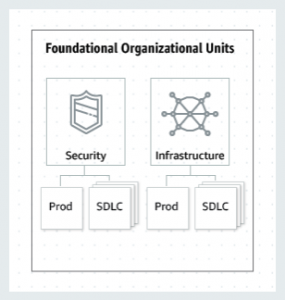
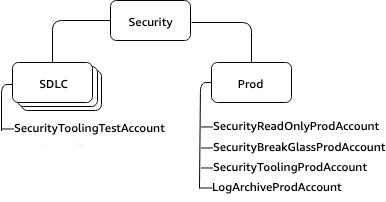
- Security OU: Groups AWS accounts that apply security policies, governance and compliance controls across the organization. The Security OU, its child OUs, and the associated AWS accounts, should be owned and managed by your Security organization.
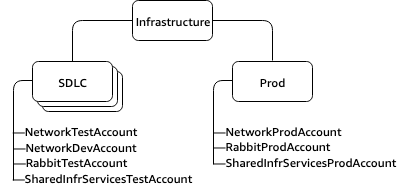
- Infrastructure OU: Groups AWS accounts that host and manage core infrastructure and networking services and resources that are shared across the organization. Example: A Customer has three shared infrastructure and networking services, providing access to the corporate networks, a hosted messaging service using RabbitMQ (message bus service), and a general shared infrastructure account.
Application OUs #
Application OUs are used to group AWS accounts for production and nonproduction workload environments.
- Workloads OU: These are the OUs where the AWS accounts for the software lifecycle are created. It is recommended that workload accounts are created to isolate software services, rather than mapping to the customer’s teams, to make the deployed application more resilient to organizational change. Transferring access to a set of accounts from one team to another is easy, while moving software services from one account to another is a much larger task.
Accounts in non-prod OUs should have no dependency on other OUs.
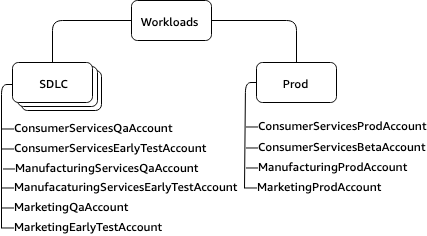
Example: A customer has three different business units, Manufacturing, Consumer Services and Marketing, all of which share governance and operational models. Consumer Services has a public beta, which the OUs do not have. In this case it is recommended to have the following structure:
Experimental OUs #
Experimental OUs are used to group accounts for research and development environments.
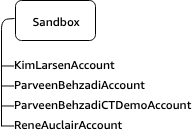
- Sandbox OU: This OU is for AWS accounts of individual technologists, in which they can learn and dive deep into AWS services. It is recommended that accounts within this Sandbox are detached from the customer’s internal networks. Access to the internet is required to access AWS services, but it is recommended that this be limited. Also consider a fixed spending limit for these accounts, for example $100 per month, which is reported to leadership, to track outliers and excessive usage.
GovCloud #
AWS GovCloud accounts and commercial AWS accounts cannot be in the same OU.
AWS GovCloud and commercial AWS accounts operate in separate physical data centers. US-East (GovCloud Ohio) and US-West (GovCloud Oregon) are only GovCloud regions. They are not considered the same regions as us-west-1 or us-east-2 for example. Even though they share the same sites.
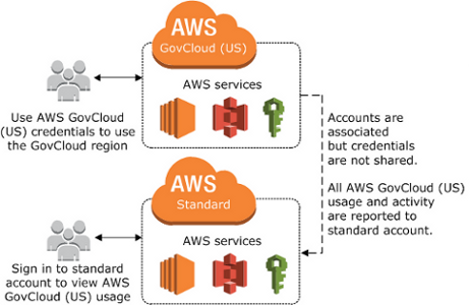
An AWS GovCloud (US) account is always associated to a single standard AWS account for billing and payment purposes. All AWS GovCloud (US) billing is billed or invoiced to the associated standard AWS account. You can view the AWS GovCloud (US) account activity and usage reports through the associated AWS standard account only. You can associate only one AWS GovCloud (US) account to one standard AWS account.
If you use AWS services in other AWS Regions with the standard AWS account, your account activity and usage reports are combined. If you want to separate billing and usage between the two accounts, create a new standard AWS account that you use only to associate with your AWS GovCloud (US) account. We recommend creating a new AWS account that will only be used for AWS GovCloud (US) sign up and billing.
GovCloud OU #
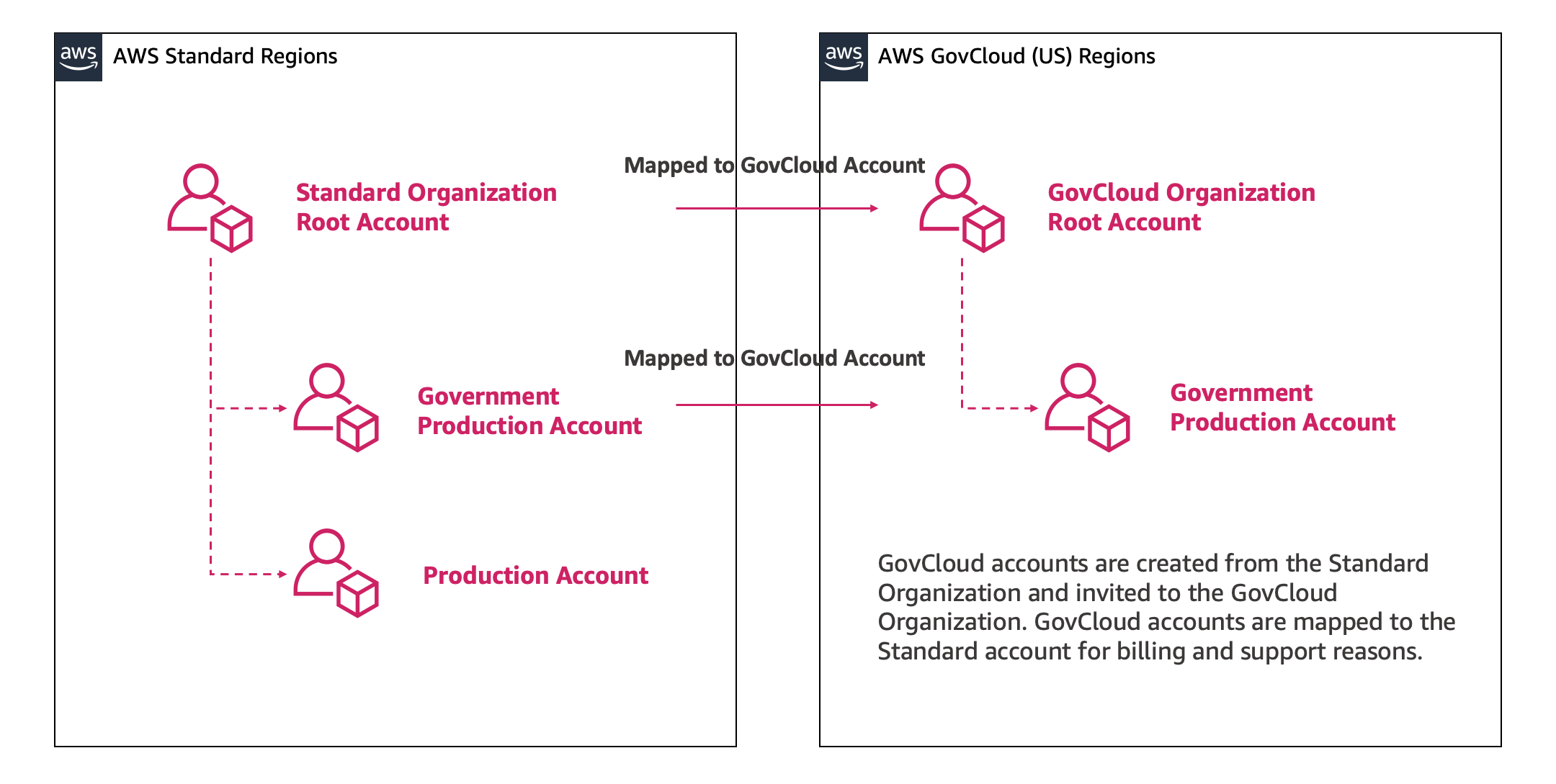
If you are using AWS Organizations to manage accounts within AWS standard regions, you can create the new standard account from AWS Organizations console or using the AWS Organizations API. Your AWS Organization in your standard AWS account is separate from the AWS Organizations in your AWS GovCloud (US) should you choose to create one, even though the accounts are linked. You must manage each separately. Only the standard AWS account will be managed by the existing Organization.
You can create a new AWS Organizations within the AWS GovCloud (US) partition by creating a set of new accounts, creating a new AWS Organizations root within one of the new accounts, and inviting the other AWS GovCloud (US) accounts to the new AWS Organization. When you invite an account, AWS Organizations sends an invitation to the account owner, who can decide to accept or decline the invitation.
Procedural OUs #
Procedural OUs are used to group accounts for process driven activities on AWS Accounts.
- Exceptions OU: Groups AWS accounts that host workloads requiring specific configurations or policies that deviate from the organization’s standard governance model.
There are instances where a business use case warrants an exception from security or auditing conditions defined under OU:Workloads. When one of these cases is identified, an exception may be granted. In those cases, the accounts will be given a customized security stance. Accounts under the OU:Exceptions have SCPs applied directly to the account instead of the OU, due to the custom nature of their use cases. Owners of these accounts can also expect to have higher scrutiny from detect and react systems in place (Amazon CloudWatch Events, AWS Config Rules, etc.), due to the customized preventative controls.
- Transitional OU: Temporary OU for housing AWS accounts during migration or restructuring processes, ensuring controlled management and gradual integration into the organization’s standard governance structure.
The Transitional OU is intended as a temporary holding area for existing accounts and workloads that you move to your organization before you formally integrate them into your more standardized areas of your AWS environment structure. You may need to move accounts due to an company acquisition, or taking over the accounts previously serviced by a third party. This OU gives you a temporary place to assign accounts that may not fit into your OU structure.
- Suspended OU: Groups AWS accounts that have been temporarily suspended or deactivated due to security concerns, policy violations or other administrative reasons.
Contains AWS accounts that have been closed and are waiting to be deleted from the organization. Attach a Service Control Policy (SCP) to this OU that denies all actions. Ensure that the accounts are tagged with details for traceability, if they need to be restored. Accounts that are closed for 90 days are subject to permanent deletion, after which the account and its resources can’t be recovered.
- Policy Staging OU: Hosts AWS accounts that are used to test and validate new or modified organizational policies before applying them to production environments.
To verify changes, an administrator needs the ability to build and apply changes they want to make, in a non production-impacting way. The organizational unit “OU:PolicyStaging” is a non-production OU, which gives an organization administrator a place to test a proposed OU setup, to verify results of applying a policy.
It’s recommended that child OUs and accounts be created to test the changes. Once the changes are understood and verified, a rollout strategy can be employed to slowly apply changes to the broader organization. It’s recommended to start rollout at the minimum possible level, on an account in the intended location. Promote changes in your OU structure as you gain confidence. Making changes in this way will minimize your possible blast radius. Example: The Policy team is managing the policies for security, infrastructure, workloads, code, and deployment. To stage these they have the following structure:

Advanced OUs #
Advanced OUs are used to group accounts for specific advanced use-cases.
-
Individual Business Users OU: Groups AWS accounts associated with individual employees or business units, ensuring appropriate access controls and compliance with organizational policies. A limited access OU that contains AWS accounts for business users who are not technologists. These users may create business productivity-related applications, for example, set up an S3 bucket to share reports or share files with a partner.
-
Deployments OU: Groups accounts that host services and resources used to orchestrate the deployment of applications, services and infrastructure across multiple AWS accounts within an organization. Contains AWS accounts meant for CI/CD deployments. You can create this OU if you have a different governance and operational model for CI/CD deployments, as compared to accounts in the Workloads OUs (Prod and SDLC).
-
Business Continuity OU: Houses resources and accounts specifically designed for disaster recovery, backup and ensuring continuous operations of critical business functions across the organization.
References #
Design principles for your multi-account strategy
Best Practices for Organizational Units with AWS Organizations